
A website redesign SEO checklist helps preserve useful pages and search visibility while improving the customer journey. SEO work begins before new layouts are approved, with an inventory of the URLs, content and enquiry paths that matter.
Use this checklist to give the designer, developer and person responsible for search a shared launch plan.
Before design: identify what needs to survive
List your public URLs and record their purpose, search performance and relevant enquiries. Use business records alongside analytics so the plan does not prioritise traffic that has little commercial value.
Mark each important page for retention, improvement, consolidation or retirement. A service page that brings suitable enquiries deserves a clear owner during the redesign.
Keep a copy of titles, main headings, useful content, internal links and key downloads. Record how forms and telephone links work before changing the templates.
Plan URL changes before development
Keep established URLs where they still suit the content. Where a change is needed, map the old address to a relevant replacement and document the intended permanent redirect.
Avoid sending unrelated retired pages to the homepage just to remove errors. Choose destinations that help the person who followed the old link. Our 301 and 302 redirect guide explains how the intended change affects that decision.
Agree who implements redirects and who checks them. An approved spreadsheet has no effect until the live website behaves as intended.
During the build: preserve the page’s purpose
Review the new layouts against the services and searches the business wants to support. A visually cleaner page still needs to explain the offer, location, evidence and next step.
Check navigation, contextual links, mobile readability and forms. Confirm that important content appears in the rendered page rather than existing only inside design files.
Protect the staging environment appropriately. Also document how production restrictions will be checked at launch, so a setting used for staging does not unintentionally carry over to the public website.
At launch: verify the live behaviour
Assign a named person to each check and copy the table into your launch record. The first five rows are a template: replace the suggested roles with your owners and leave each result as Not checked until the evidence is recorded.
| Check | Owner | Pass / fail | Verification evidence |
|---|---|---|---|
| Important public pages load | Website editor or developer | Not checked | Final URLs, HTTP responses and confirmation that the intended content is visible. |
| Changed URLs redirect correctly | Developer | Not checked | Old URL, intended destination, redirect response and final response; record unnecessary chains. |
| Canonical signals match the plan | SEO reviewer | Not checked | Declared canonical, consistent internal links and later indexed canonical information where available. |
| Navigation reaches final URLs | Website editor | Not checked | Checks of menus, contextual service links, breadcrumbs and key downloads. |
| Enquiries work | Website owner and receiving team | Not checked | A labelled test received by the correct team, expected confirmation and separately checked tracking. |
| Completed example: SERP Radius Mississauga URL move | SERP Radius | Pass for the checked URL responses | /seo-services-mississauga/ returns HTTP 301 to /locations/mississauga/; the destination returns HTTP 200. |
The completed example is from our own website. It verifies the redirect and destination response, not every launch check or a ranking improvement. Our redirect migration example explains the implementation and the distinction between a technical check and a search outcome.
Check representative templates and high-value pages on a phone. Include an actual enquiry-delivery test in the launch plan; seeing a form on the screen does not establish that a message reaches the business.
After launch: review Search Console evidence
Inspect important final URLs in Search Console. Review available crawl and canonical details as Google processes the website.
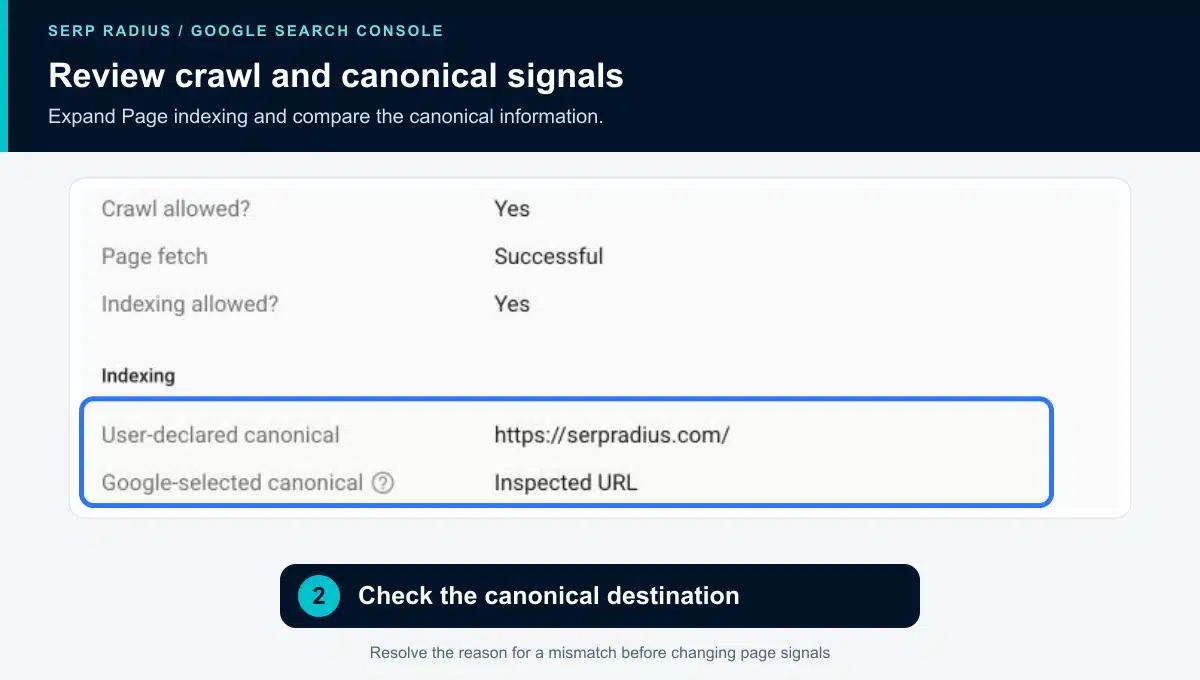
Use URL Inspection as a follow-up check alongside direct tests of the live website.
If traffic changes, compare the affected landing pages and queries. Check whether the problem is a missing URL, a changed page purpose, a technical restriction or a measurement change before reversing the redesign.
Do not interpret a single quiet day as a complete outcome. Keep the pre-launch baseline and annotate the release so later comparisons have context.
Give every launch issue an owner
For each failed check, record the impact, responsible person and follow-up evidence needed. Prioritise inaccessible service pages and broken enquiry routes before cosmetic reporting concerns.
If your business is planning a redesign, request a technical SEO consultation. SERP Radius can help identify what needs to be preserved and which checks belong in the launch plan.
For changes to existing addresses, follow Google’s site move guidance for URL changes.
After launch, check if key pages are indexed and investigate unexpected canonical choices.
If your sitemap changed, follow the steps to submit the sitemap in Google Search Console.