
Ecommerce category page SEO helps shoppers find and compare a relevant group of products. Give each category a clear purpose, link it to suitable products and explain the buying decisions the collection supports. Keep individual product specifications and genuinely different shopping tasks on their appropriate pages.
For a Mississauga seller, local information matters when it changes the purchase: verified pickup arrangements, actual delivery coverage or a showroom visit. A city name alone does not make an online collection more useful.
Separate categories, products and filters
A category groups products around a shopping need, such as insulated drinkware. A product page describes a particular item. A filter narrows the collection by an attribute such as capacity or colour.
Start with those roles before choosing which URLs should appear in search. A filter combination deserves separate consideration only when it serves a distinct, useful shopping task and can be maintained. Automatically exposing every combination can create many repetitive URLs.
Google’s ecommerce site-structure guidance recommends linking through the hierarchy to products. Important products should be reachable through ordinary links, rather than depending entirely on a search box.
Assign one shopping task to each category
Imagine a hypothetical Mississauga seller offering reusable drinkware. Its planning map could look like this:
| Shopping task | Page owner | Content boundary |
|---|---|---|
| Compare insulated drinkware | Main category | Selection criteria and relevant products |
| Check a particular bottle | Product page | Capacity, materials and approved specifications |
| Narrow by colour | Filter control | Refine the displayed assortment |
| Collect an eligible order locally | Pickup information | Verified location and collection process |
This is an example of page ownership, not a description of a client’s catalogue. The business must supply its own product and fulfilment facts.
Check the map against search intent. Someone comparing a collection needs a different landing page from someone searching for a specific model number.
Write copy that helps the selection
Put a concise explanation near the collection heading. State what the category includes and identify a meaningful choice, such as size, intended use or compatibility. Keep products easy to reach.
Use additional sections where they answer real questions that apply across the collection. Explain a specification only when it is accurate for the products shown. Avoid adding a long generic introduction about the benefits of shopping online.
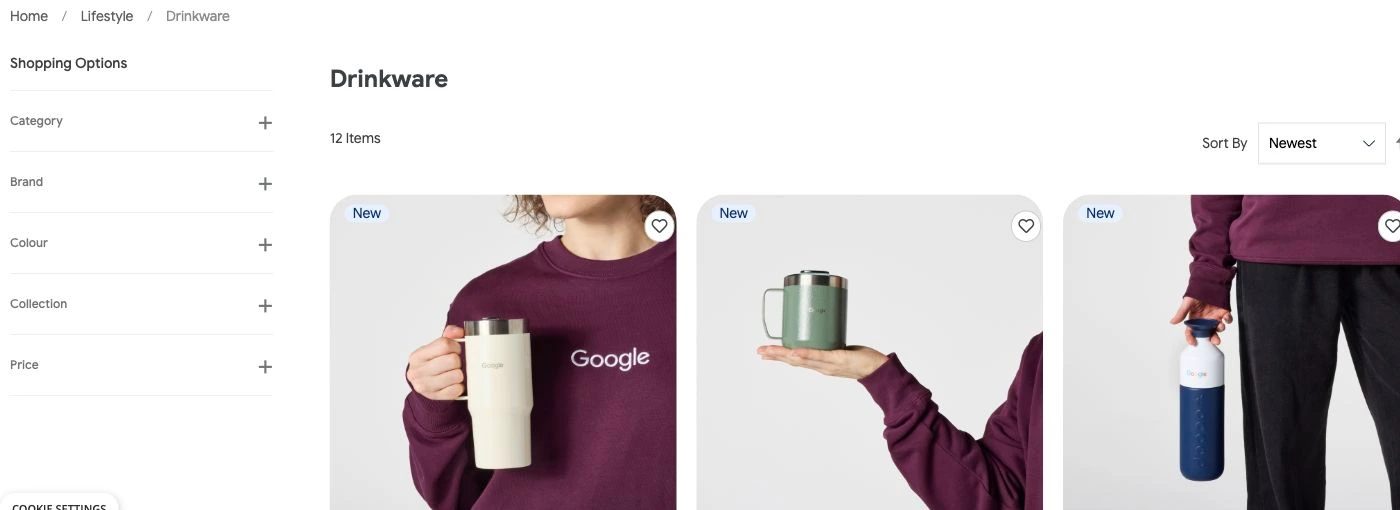
The public Google Merchandise Store drinkware category provides an observable example of products and shopping controls on a category page. It is a structural reference, not a Mississauga business, client example or claim about SEO performance.
Make local fulfilment precise
If pickup is available, explain which orders qualify, how readiness is confirmed and where customers should go. Link to the maintained pickup policy rather than repeating details across every category.
If the business only ships to Mississauga, describe the actual shipping arrangements where relevant. Do not present a warehouse or administrative address as a walk-in retail location without confirmation.
Our existing Burlington retail SEO guide addresses store discovery and visits. Category planning has a separate job: helping online shoppers choose among products.
Check empty and changing collections
Review categories after stock changes. A temporarily empty collection with useful information requires a different decision from a discontinued collection with no replacement.
Check what a customer sees, whether the page returns the intended status and where internal links lead. Do not redirect every retired category to the homepage. Choose a replacement only when it meaningfully satisfies the same shopping need.
If a redesign changes collection URLs or navigation, use the website redesign SEO checklist to plan those changes before launch.
Check the collection links
Follow the navigation from the homepage to a category and then to representative products. Check breadcrumbs and return paths as well as the product cards. If a product moves between collections, confirm that important links still lead to its intended URL. Record broken or misleading destinations as specific fixes rather than treating every navigation issue as a need for more category copy.
Measure categories as commercial entry points
Group category URLs separately from product URLs in Search Console and analytics. Review relevant queries, landing sessions, product exploration and completed purchases where tracking is implemented correctly.
When a category receives impressions but few useful visits, inspect its search intent and snippet before expanding the copy. When shoppers arrive but cannot find suitable products, examine the assortment and navigation.
SERP Radius’s SEO services in Mississauga can connect category research with the commercial page structure. The aim is a manageable catalogue in which each important shopping task has a clear owner and a useful next step.