
A local SEO audit checklist should establish whether customers can find your business, understand its services and complete an enquiry. Check your Google Business Profile, service pages, reviews, listings and measurement, then turn each confirmed problem into a task with an owner and a validation step.
Start with one location and the services you want to sell. Record the profile URL, priority website pages and audit date. Keep screenshots alongside your notes so the next person can reproduce each finding.
1. Establish a useful search baseline
Choose a small set of relevant service searches. Record where you searched from, the date, device and whether you checked Maps or standard organic results. One search from your office cannot describe visibility across Toronto.
Google explains local results through relevance, distance and prominence. Compare genuinely competing businesses serving similar needs. Record their useful service information, reviews and enquiry options without assuming every difference causes a ranking gap.
2. Check the profile customers actually see
Sign in to the account managing your Business Profile and open Edit profile. Review the real business name, categories, services, phone number, website destination and hours, including holiday hours. Check whether the address or service-area presentation accurately reflects how customers receive the service.
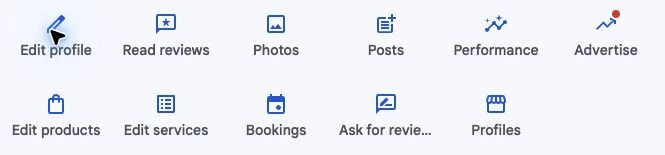
Open the public listing separately and follow its website link. A correct URL in your notes is insufficient if customers reach an outdated page. Use Google’s business representation guidelines when assessing eligibility and business details. For a missing listing, follow our Google Maps visibility troubleshooting guide.
Review the logo and recent photos for an accurate picture of the business. Flag outdated premises or services. Assess booking links, products and attributes where they apply; an unavailable feature is not automatically an audit failure.
3. Inspect the service page and enquiry route
Use Search Console’s URL Inspection on the actual landing page. Review its indexing status and Google-selected canonical. Our inspection below confirms that the Local SEO Toronto page is indexed; this does not establish where it ranks.
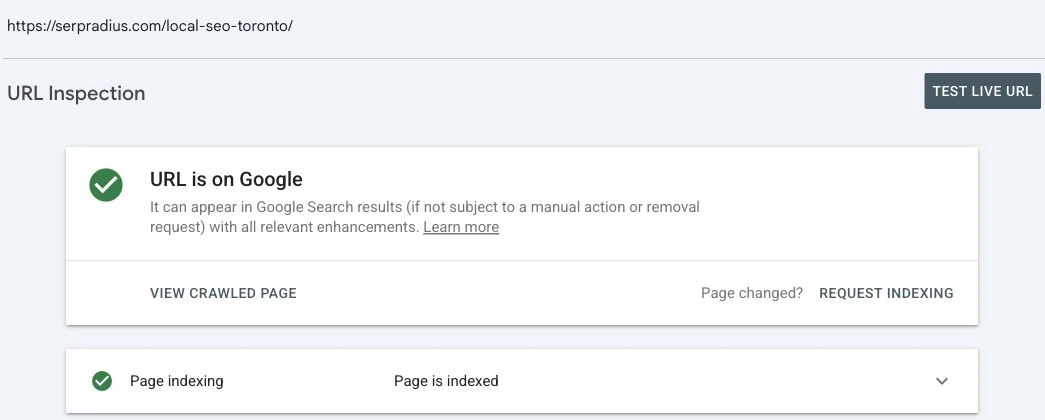
Then open the page on a phone. Can visitors identify the service, coverage, relevant evidence and next step? Check the title, main heading, readable content and links from supporting articles. Test contact controls and form delivery using an agreed test process. Record failures before commissioning more content.
The URL Inspection documentation distinguishes Google’s indexed information from a live test. Record which view supports your finding. When reviewing internal links, confirm that each anchor describes the destination and that the link works without requiring a site search.
4. Review trust and conflicting information
Check important industry listings for an old phone number, wrong website or obsolete address. Prioritise inaccurate listings customers actually encounter; our local citation guide explains the wider review.
Read recent reviews for recurring service concerns and unanswered questions. Check that review requests invite genuine feedback without incentives, following Google’s review guidance. A competitor’s review count provides context, not a guaranteed target.
5. Turn findings into a local SEO audit template
Give each issue five fields: evidence, business consequence, owner, fix and validation. The hypothetical contractor example below shows the level of specificity to use. These are illustrative problems, not client results.
| Audit field | Profile example | Service-page example |
|---|---|---|
| Evidence | Website button opens an old service URL. | Enquiry button fails on mobile. |
| Consequence | Customers reach outdated information. | Interested visitors cannot enquire. |
| Owner | Profile manager. | Website developer. |
| Fix | Use the current relevant landing page. | Repair the button destination. |
| Validation | Open the public listing and follow the link. | Complete an agreed mobile enquiry test. |
Fix confirmed access and contact failures first. Next address inaccurate business information and missing service details. Assess content expansion and authority work after those foundations. Set priorities by customer consequence, confidence in the evidence and implementation effort.
Separate confirmed defects from hypotheses. If visibility is weak but no fault is established, assign an investigation with a clear question rather than describing an untested assumption as a completed diagnosis.
6. Verify repairs and measure what follows
Keep a change log and repeat the original checks after implementation. Compare Search Console impressions and clicks over consistent periods, alongside qualified enquiries. Use our Business Profile Performance guide to distinguish profile interactions from actual customer outcomes.
If you need help converting findings into implementation priorities, explore SERP Radius’s local SEO services in Toronto. Bring the evidence, affected pages and unresolved questions to the discussion.