
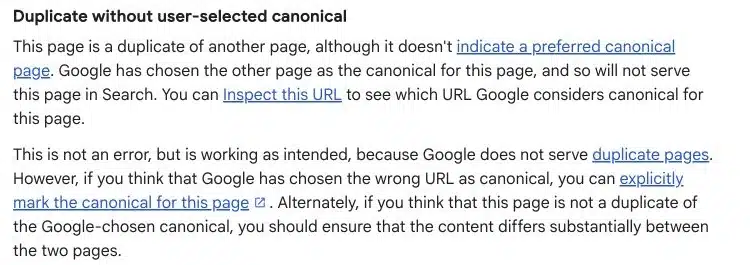
“Duplicate without user-selected canonical” means Google considers a URL a duplicate and has not found a canonical preference declared by the site for that duplicate. Google has selected another URL for indexing. The status describes what Google did; it does not, by itself, identify the correct business decision.
Before adding a canonical tag, compare the excluded URL with the selected version. Decide whether the pages really should represent one piece of content or two distinct resources.
Start with the URL you want customers to find
Imagine a fictional consultancy whose service page is accessible at both /services/tax-advice/ and /tax-advice/. The same text and offer appear at both addresses.
The owner wants one page in search and one address in internal navigation. In that situation, consolidation may be appropriate. If the two URLs instead describe genuinely different services, treating them as interchangeable could hide a useful page.
Our first diagnostic question is therefore: what should each URL do for the visitor?
Inspect the excluded page and Google’s selected version
Open the affected URL in Search Console’s URL Inspection tool. Review the indexed information, including the declared canonical where available and Google’s selected canonical. Inspect the selected URL too.
Google distinguishes indexed information from live testing. A live fetch helps check current access, but it does not prove that Google has already reprocessed a changed canonical decision.
Record the two addresses, their intended roles and the inspection date. That small record is more useful than a screenshot of the exclusion count alone.

Compare the signals around each URL
For a WordPress website, our recommended review covers the following:
| Check | Question to answer |
|---|---|
| Content | Are the pages equivalent, partially overlapping or genuinely different? |
| Response | Does each URL return content, redirect or fail? |
| Canonical output | Is there a deliberate preference, missing output or more than one declaration? |
| Internal links | Which address do menus, articles and service pages use? |
| Sitemap | Which URL is presented as the preferred public page? |
| Generation source | Does a template, plugin, parameter or duplicate page create the alternate? |
Do not assume the SEO plugin is the only source of canonical output. A theme or custom integration may also affect the rendered page.
Choose a response based on the page’s purpose
If the duplicate has no continuing purpose, assess a permanent redirect to the useful replacement. If both addresses need to remain accessible for legitimate reasons, an appropriate canonical preference may fit. If the pages should serve distinct searches, review whether the content and internal navigation make those differences clear.
Google’s canonicalization overview explains how it groups similar URLs. Its consolidation guidance describes the signals available to site owners. A declared preference is a signal, rather than a command guaranteeing Google’s selection.
Our implementation example: aligning a moved page
When SERP Radius moved the Mississauga service page under the Locations hub, we implemented a permanent redirect from the old path. We also updated the canonical, sitemap, structured-data URL references and internal links.
The useful point is the consistency of the change. We did not leave the old address in the sitemap while asking visitors and crawlers to use the new one.
This is a documented migration example. It is not a documented recovery case for “Duplicate without user-selected canonical.” The distinction matters when assessing the evidence behind a troubleshooting recommendation.
What to check after making a change
First verify the current implementation directly. Open the intended canonical without an administrator login, inspect its response and canonical output, and check the relevant internal links.
Then use Search Console to follow Google’s subsequent processing. Record what changed and when. Requesting indexing for an eligible preferred page does not guarantee inclusion or a fixed processing time.
If Google’s selection still differs, compare the URLs again. Look for an unresolved content similarity or a preference signal that still points elsewhere. Avoid repeating the same change simply because the historical report has not immediately updated.
Should you fix every excluded duplicate?
Prioritize an important preferred page being excluded incorrectly, an unintended duplicate exposed throughout navigation or a configuration generating many unnecessary variants. A duplicate status is less urgent when Google already selected the intended, accessible version.
For the broader issue, read our duplicate-content guide. For a URL explicitly recognized as an alternate with a canonical, Google’s indexing report definitions explain the different status.
If you need help identifying which URLs should remain and which signals conflict, discuss a technical SEO audit with SERP Radius.