

To add your business to Apple Maps, use Apple’s business-management tools to add or claim the correct location, provide accurate details and complete the verification requested for your situation.
One detail makes older tutorials confusing: Apple now describes Business Connect as part of Apple Business. Use the current official workflow rather than trying to reproduce every label in an older screenshot. Apple’s transition notice explains the change.
Prepare a location record before signing in
Our recommendation is to gather the details in one place before editing a listing. Record the customer-facing business name, address where applicable, correct entrance or map position, phone, website, hours and a suitable category.
For a business with several locations, make a separate record for each. Ask which number reaches that location and which webpage explains it accurately. A general company record may not answer a customer’s branch-specific question.
Do not create a physical-office claim simply because the business serves an area. This guide does not establish eligibility for a virtual office or every service-area business arrangement; check Apple’s current requirements for the actual business.
Find an existing listing before creating a new one
Search Apple Maps and the management workflow for the business. If a location already exists, identify whether it is the correct place and follow the relevant existing-location or management-transfer process.
Creating another listing to work around an access problem can leave the business with more information to reconcile. Keep a record of what already exists and who is authorized to manage it.
Add or claim the location in Apple Business
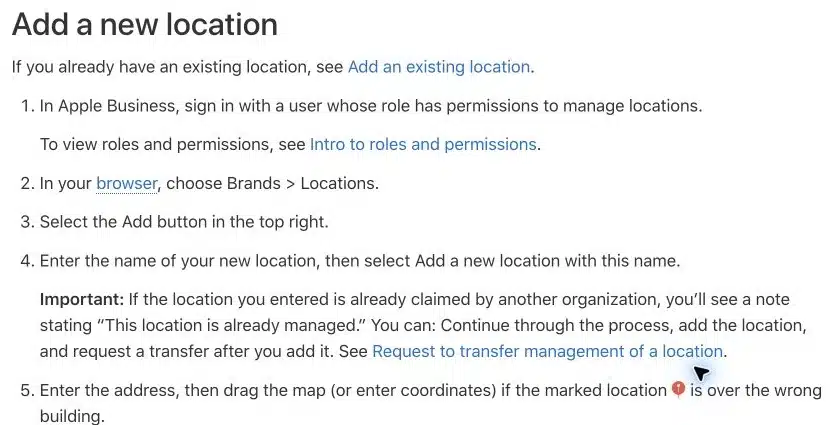
Apple’s current location instructions describe signing in with permission to manage locations, navigating to Brands > Locations, and using Add. Select an existing location or add a new one as appropriate.
Review the name, address and map position, then provide the requested category, contact details, operating hours and brand association. Follow the available organization or location verification steps. An already managed location may require a transfer rather than a new duplicate entry.
Use Apple’s instructions for the options your account actually displays. A required check can depend on whether the organization or location has already been verified.
Example: a fictional clinic with a misleading map pin
Imagine a clinic whose street address is correct but whose map pin points toward the rear of a large building. Patients enter through a different side.
Our suggested review would compare the map position, entrance information where supported and the clinic’s own directions page. Then someone would check the public place card from a customer’s phone.
This is a teaching example, not an agency client result. It illustrates why a complete submission is not the same as an accurate arrival experience.
Check the public information after review
Once the relevant changes are available publicly, use a separate customer-style check. Search for the business, open its place card and compare it with your prepared location record.
| Customer task | What to check |
|---|---|
| Find the business | Correct identity and location |
| Travel there | Sensible map position and usable directions |
| Call | Correct public phone number |
| Visit the website | Correct page loads on mobile |
| Plan a visit | Hours match the business’s current arrangements |
Assign an owner to corrections. Without one, the same discrepancy can remain unresolved across the website, booking instructions and directory entries.
What our local-page work contributes
For SERP Radius’s own city pages, we kept service coverage separate from physical-office claims. We also preserved the actual geography of existing case studies rather than making them appear local to a newly added city.
The same accuracy principle is useful when preparing location information: describe what the business can substantiate. Our city-page work is documented; this article does not present an Apple Maps implementation as a completed agency case study.
How to keep the listing useful
Treat an address change, new phone number, holiday schedule or website migration as a reason to review the public listing. Keep the relevant account access under business control and document who can maintain the information.
For broader planning, our local citation guide covers listing selection and consistency. Our service-area page guide explains the different role of website pages serving several areas.
Will an Apple Maps listing increase traffic?
A completed listing makes accurate business information available within that product; it does not establish a traffic or enquiry gain. Track meaningful customer actions where the available reporting and your attribution setup permit, and keep listing checks separate from performance claims.
If you need help reviewing how your website and public business information fit together, contact SERP Radius about local SEO.